This section deals with:
• Letters
• Cash delivery requests
• Change/clarification of requisites requests
• Applications for contribution of funds to a settlement account
• Pre-order of cash for further withdrawal by cheque
• Delcarations of acceptance
• Deal confirmations
Actions with documents
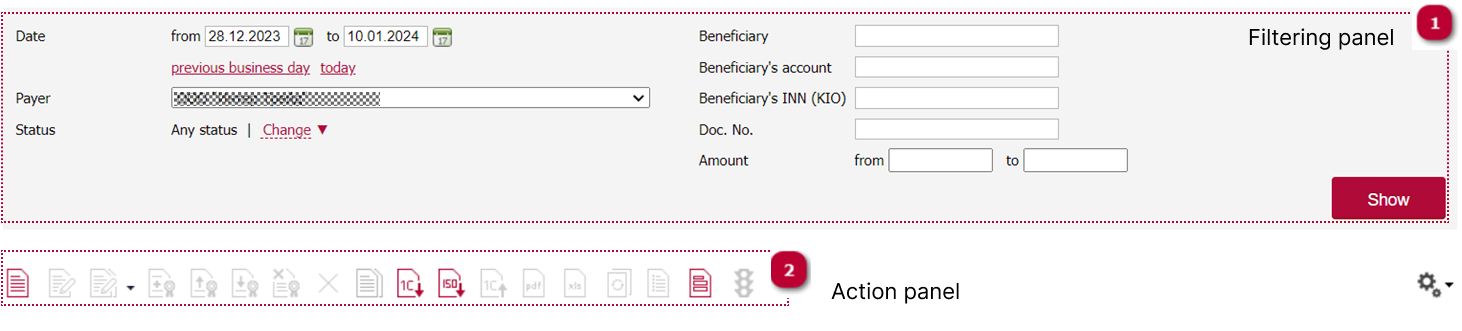
| 1. Choose search criteria for the document and click Show. | |
| 2. Choose the required action with the document in the Action panel. |
 |
New |
 |
Edit |
 |
Mass edit (change transfer type, payment due terms, choose transactions under an agreement with obligations not exceeding 600k rubles) |
Note! You can only edit documents in the New status
 |
Sign |
 |
Download signatures |
 |
Send to Bank |
 |
Unsign/Withdraw document |
 |
Delete |
 |
Copy |
 |
Import from 1C |
 |
Import from ISO format |
 |
1C payment register |
 |
Export to PDF |
 |
Export to Excel |
 |
Request duplicate |
Note! The service may be charged in accordance with the applicable tariff plans.
 |
Create clarifying document |
 |
Templates |
 |
Verify counterparties |
Creating applications and requests
| 1. Go to the Documents section. | |
| Choose the required application or request type. | |
| 3. Click New. |
| 4. Fill the fields in the application or request form. | |
| Click Sign and send if you want to send the document to the Bank immediately or Save if you want to send it later. |
Note! The service may be charged in accordance with the applicable tariff plans.